Teleprompter technology has transformed the way creators, broadcasters, and business professionals deliver on-camera content. Whether you’re recording YouTube videos, hosting live streams, conducting interviews, or producing corporate presentations, the right teleprompter eliminates the need to memorize scripts — letting you speak naturally while maintaining direct eye contact with your audience. This guide covers everything you need to know about choosing the best teleprompter for video in 2026, from camera-mounted options to Mac-compatible software solutions.
Teleprompter for Camera: What to Look For
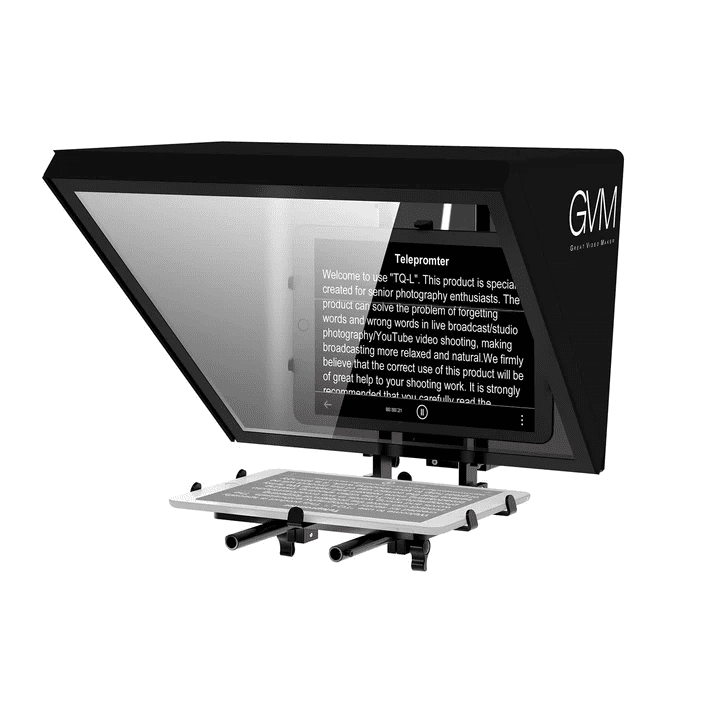
A camera-mounted teleprompter sits directly in front of your lens, reflecting scrolling text on a beam-splitter glass while remaining invisible to the camera. This design allows you to read your script while appearing to look directly into the lens — the gold standard for professional on-camera delivery.
When evaluating a teleprompter for camera use, the most critical factor is beam-splitter quality. Low-quality glass introduces ghosting, colour distortion, and light loss that degrades your footage. Professional-grade teleprompters use multilayer dielectric coated hard film beam-splitters that transmit zero light loss and eliminate ghosting entirely — your image quality remains completely unaffected during shooting.
Screen size is equally important. Compact teleprompters with small displays force you to use larger font sizes, reducing the amount of visible script at any one time and creating unnatural eye movement. Larger screens — 15 inches and above — allow comfortable reading at greater distances, with text clearly visible up to 15 feet away even under challenging lighting conditions.
Build material separates professional from budget options. Aluminum alloy construction provides the rigidity needed to support a camera on top of the teleprompter hood without flex or wobble, while remaining light enough for solo operation. Avoid plastic-bodied teleprompters for anything beyond casual use.
Teleprompter for YouTube Videos: Deliver Every Video With Confidence
YouTube creators face a unique challenge: producing consistent, polished content regularly without the budget or crew of a broadcast studio. A teleprompter for YouTube videos solves the most common production problems — stumbling over words, losing your place in a script, requiring excessive retakes, and struggling to maintain natural eye contact with the camera.
The ideal YouTube teleprompter combines ease of setup with smart app control. Look for units that pair with an iOS or Android app offering adjustable font size, variable scroll speed, and customizable background colour. A Bluetooth remote control for scroll speed and start/stop functions allows you to manage prompting hands-free between takes — critical for solo creators without an operator.
Wide-angle lens compatibility is another key consideration for YouTube shooters. Standard teleprompters can introduce vignetting — dark edges — when used with wide-angle lenses, which are common for talking-head and tutorial-style content. A large-screen teleprompter with a wide-angle optimized design eliminates vignetting entirely, keeping your full scene in frame whether you’re shooting solo or with multiple presenters.
Product Spotlight: GVM TQ-LD Teleprompter
For creators and professionals seeking a premium all-in-one solution, the GVM TQ-LD Teleprompter represents the current benchmark in its category. Here is a complete specification overview:
| Spezifikation | Details |
|---|---|
| Brand | GVM |
| Modell | TQ-LD |
| Display Size | 18.5-inch Android All-in-One Monitor |
| Beam-Splitter | Multilayer dielectric coated hard film (no light loss, no ghosting) |
| Viewing Distance | Up to 15 feet (4.5m) in any lighting condition |
| Kompatibilität | DSLR, mirrorless, camcorders, professional video cameras |
| Berg | Standard 1/4″ and 3/8″ screw mounts |
| Max Load Capacity | 10 kg |
| Abmessungen | 575 × 415 × 380 mm |
| Gewicht | 7.5 kg |
| Material | Aluminiumlegierung |
| App Control | iOS / Android GVM prompting app |
| Remote | Bluetooth remote (scroll speed, start/stop) |
| Regular Price | $790.00 USD |
| Sale Price | $553.00 USD (Save $237.00) |
| Warranty | 2-year worry-free warranty |
| Returns | 30-day free return, no hassle |
| Shipping | 5–10 days, full tracking |
| Origin | Huizhou, China |
The GVM TQ-LD’s 18.5-inch screen is specifically optimized for wide-angle lenses, eliminating the vignetting problem that affects smaller teleprompters. Its universal 1/4″ and 3/8″ mount system accepts DSLRs, mirrorless cameras, camcorders, and professional broadcast cameras without adapters — making it genuinely compatible with any existing camera setup. The aluminum alloy base and bracket deliver a maximum load capacity of 10kg, supporting even the heaviest professional camera and lens combinations.
Clear Teleprompter
The term “clear teleprompter” refers to a unit whose beam-splitter glass is optically transparent enough that it introduces zero visible degradation to the camera image. This is the single most important technical specification in any teleprompter purchase — and the area where budget products consistently disappoint.
A professional clear teleprompter uses colorless beam-splitter glass with multilayer dielectric hard film coating. This construction achieves two critical outcomes: first, the reflected script text is bright and sharp enough to read at distance under any lighting conditions; second, the glass transmits the scene to your camera lens without colour cast, reduced contrast, or visible ghosting artifacts.
Inferior beam-splitter glass — typically found in teleprompters under $100 — uses uncoated or single-layer glass that introduces a green or yellow colour tint, reduces image contrast, and produces ghost reflections of the text that can appear faintly in your footage. For professional productions, broadcast work, or any content where image quality is non-negotiable, investing in optically correct beam-splitter glass is essential.
Teleprompter for Mac
For creators working in a Mac ecosystem, teleprompter solutions fall into two categories: dedicated hardware units with companion apps, and Mac-based software that turns any external display into a prompting screen.
Hardware with Mac-compatible apps such as the GVM TQ-LD work seamlessly with iOS devices via the GVM prompting app, which mirrors to external displays and offers full script management including font size adjustment, scroll speed control, and background colour customisation. Since the app runs on iOS, iPad users can use their device as the teleprompter display within a compatible hood.
Mac teleprompter software options including Teleprompter Premium, Autocue’s software suite, and PromptSmart Pro allow you to use a MacBook or Mac-connected monitor as a dedicated prompting display. This approach works well for desktop or studio setups where a dedicated second monitor can be positioned behind a beam-splitter hood. Most professional Mac teleprompter software supports remote control via iPhone or iPad, maintaining the hands-free operation that makes teleprompters practical for solo creators.
For Mac users building a complete studio setup, combining professional hardware like the GVM TQ-LD — which accepts a tablet or smartphone as its display source — with a Mac-based script management workflow provides the best of both worlds: hardware-grade optical clarity with the flexibility of desktop script editing.
Abschließende Gedanken
Das Recht Teleprompter transforms your on-camera performance immediately and measurably. Clear, confident delivery — achieved without memorisation, without excessive retakes, and without breaking eye contact — is the difference between content that retains viewers and content that loses them. Whether you’re a solo YouTube creator, a corporate communications professional, or a broadcast producer, investing in a quality teleprompter with professional beam-splitter glass, smart app control, and universal camera compatibility is one of the highest-return upgrades you can make to your production setup in 2026.