
Picking the right dmx control for video lighting comes down to set permanence and 2.4 GHz congestion. If lights live overhead, wire 5-pin DMX512 (512 channels, zero latency, 120-ohm terminator). Moving two to six fixtures between locations? Group them via GVM Bluetooth Mesh from a tablet within 50 m.
Key Takeaways
- Ceiling Grids (
DMX512): Hardwire1200B All-in-OneeSD700B AIOvia a 5-pin DMX, CRMX, or Art-Net box. - Location Sets (
Bluetooth Mesh): GroupPRO SD300CePRO-SD650Bfrom one tablet—skip the cables. - Termination: Plug a 120-ohm 5-pin DMX terminator into the last
DMX OUT.

Quick Setup Map: Match Your Set to the Right DMX Control for Video Lighting Rig
Before you pull data cable or pair app zones, answer three things. Is this rig staying up for months, or coming down tonight? How many fixtures are you running? And how noisy is the RF in the room?
| Space & Shooting Format | Lighting Layout | Primary Key / Overhead Pick | Fill / Modifier Pairing | Control Hardware & Termination |
|---|---|---|---|---|
| 1. Mobile 3–4 Light Documentary / Commercial Crew | Wireless GVM Bluetooth Mesh App Grouping | PRO-SD650B or PRO-SD500B (Key Group A) | GVM PRO SD300C Softbox Kit (Rim / BG Group B) | Zero DMX Cable Runs (≤ 50 m Mesh Range) |
| 2. Mid-Size Corporate / Church Overhead Grid | Wired 5-Pin DMX512 Daisy-Chain (1 Universe) | GVM SD700B All-in-One (Addr 001, 009) |
2× PRO SD300C Cyc Wash (Addr 017, 033) |
External DMX Data Box + Hardware Console + 120Ω Plug |
| 3. Large Virtual Production / Broadcast Stage | 16-Bit Wired DMX / Art-Net + Mesh Floor Backup | GVM 1200B AIO (High Grid Key, Addr 001) |
SD700B AIO / PRO-SD650B Fill Array | Opto-Isolated DMX Splitter + 120Ω Terminator |
Speccing a multi-fixture grid for a broadcast stage, house of worship, or commercial soundstage? Browse our DMX-ready DMX film production lighting kits on the official GVM Shop for live bundle availability and studio fixture tiers.
Step-by-Step DMX Control for Video Lighting: Daisy-Chain, Addressing & Ratios
Reliable dmx control for video lighting starts with one decision: which lights stay put and which ones move. Permanent overhead fixtures deserve a deterministic copper or CRMX link. Floor accents that get repositioned between setups are usually happier on Mesh. Here’s how to wire, address, and balance a typical multi-cam rig in three steps.
Step 1: Wiring DMX for Lights — Daisy-Chain Topology, 32-Unit Bus Limit & Non-Overlapping Start Addresses
When wiring dmx for lights overhead, build one serial daisy-chain: console DMX OUT into the first fixture’s DMX IN, its DMX OUT into the next fixture, and so on. Skip passive Y-splitters; they invite signal reflections and flicker. The PRO SD300C has ANSI E1.11 5-pin XLR jacks on the head, and the PRO-SD650B/PRO-SD500B carry them on the ballast. The 1200B All-in-One e SD700B AIO use a 5-core Mini XLR Data Port instead, so you’ll need a DCB-XLR5 (5-pin DMX/RDM), CCB-XLR5 (CRMX + DMX), or LCB-RJ45 (Art-Net/sACN) box.
Keep each RS-485 leg to 32 devices at most. Past that, or whenever the run jumps between truss bars, add an opto-isolated DMX splitter. Then give every fixture a start address that clears its neighbor’s footprint in the active mode, for example: 1200B All-in-One in 16-bit 6 ch at 001, SD700B AIO in 6 ch at 009, and two PRO SD300C heads in 16-bit CCT&RGB (13 ch) at 017 e 033. Still choosing fixtures? Compare multi-light packages in our LED cinema lighting guide e movie lighting kit buying guide.
Step 2: Grouping GVM Bluetooth Mesh Zones (Key, Fill & RGB Practicals) for Fast Location Sets
Small crew, fifteen minutes to light a boardroom interview? Skip the DMX cable. Every fixture in this guide has SIG Bluetooth Mesh built in (up to 50 m line-of-sight), and each light relays app commands to the next. Split them into Group A (Key), Group B (Fill), Group C (Rim), and Group D (Cyc), then stand behind A-cam with one tablet and dial in 2700K–6800K (2000K–10000K on the PRO SD300C), 12 Source presets, and 12–16 FX, plus 60 Gels on the SD300C. In venues packed with 2.4 GHz traffic, keep the tablet within 15–30 m, or fall back to wired DMX.
Step 3: Hybrid Rigging — Hardwired Overhead Grid Keys + App-Controlled Floor Accents
Most broadcast stages end up as hybrids. Wire the ceiling keys (1200B All-in-One e SD700B AIO via DCB-XLR5 o LCB-RJ45) to an RDM DMX512 desk so talent exposure never drifts, then run floor rims and mobile fills over Bluetooth Mesh, where flexibility matters more. Before loading wall circuits, check breaker capacity (15A vs. 20A) in our video light wattage guide. Two 700W heads pull 1,400W, about all one 15A branch should carry; a single 1200W head needs its own circuit.
| Lighting Role | Angle (Off Camera Axis) | Distance to Subject | Power Ratio (vs. Key) | Modifier & GVM Pick |
|---|---|---|---|---|
| 1. Ceiling Grid Key Array (Addr 001) | 35°–45° front truss hang, 25°–30° downward pitch | 2.5–4.0 m (8–13 ft) throw | 100% (16-Bit Smooth Fader Dimming) | GVM 1200B AIO (1200W) or SD700B AIO (700W) w/ Bowens Softbox |
| 2. Multi-Cam Cross-Fill (Addr 009) | 45° opposite truss or heavy rolling stand (e.g., DL300) | 2.5–3.5 m (8–11.5 ft) | 45%–55% (2:1 Broadcast Evenness) | GVM SD700B AIO or PRO-SD650B w/ Softbox |
| 3. Truss Backlight / Hair Rim (Addr 017) | 135°–150° rear pipe grid aimed at talent shoulders | 2.0–3.0 m (6.5–10 ft) | 25%–35% (Matched Kelvin via Console) | GVM PRO SD300C w/ Gridded Softbox or Barn Doors |
| 4. Cyclorama / Set Color Wash (Addr 033) | 30°–40° even wall wash on dedicated DMX group | 1.5–2.2 m (5–7.2 ft) from wall | 30%–60% (HSI / Gel / FX Synced) | 2× GVM PRO SD300C RGBWW Monolights |
Lighting DMX Protocol: 8-Bit vs. 16-Bit DMX Channels, 120-Ohm Terminators & Shutter Sync
Getting lighting dmx resolution and cabling right is what keeps slow fades smooth and footage flicker-free. Standard DMX512 runs at 250 kbps over RS-485 on 120-ohm cable, with 8 bits (256 steps) per channel. That’s fine near the top of the fader, but below about 5% you’ll see exposure jump step by step on camera. 16-bit fine mode pairs a coarse and a fine byte for 65,536 steps, at the cost of doubling the dmx channels each fixture uses:
1200B All-in-One&SD700B AIO(8 Modes,2–8 ch, RDM): Four 8-bit modes (CCT2ch,CCT+Ctrl4ch,FX5ch,FX+Ctrl6ch) and four 16-bit modes (4/6/7/8 ch), plus four dimming curves (Linear/Exp/Log/S-Curve).PRO SD300C(Chart V1: 18 Modes,2–13 ch, RDM): Nine 8-bit modes (fromSource2ch up toCCT&RGB7ch) and nine 16-bit modes (fromSource3ch up toCCT&RGB13ch).PRO-SD650B&PRO-SD500B(Chart:6–9 ch, RDM):FX6/8 ch,CCT7/9 ch,Source7/9 ch. Heads-up: the on-fixture UI screens label the CCT modes as 2/4/4/6ch, which doesn’t line up one-to-one with the chart.
All five fixtures support RDM, so you can set addresses remotely by UID instead of climbing a ladder. On camera, turn AWB OFF, lock every body to the same manual Kelvin (5600K or 4500K), kill the overhead house fluorescents, and lock shutter speed (1/60s or 1/120s NTSC; 1/50s or 1/100s PAL).
Studio DMX512 & Bluetooth Mesh Troubleshooting: Fixing Flicker, Address Clashes & Lag
When a DMX chain strobes or a Mesh group drops out, the cause is almost always one of four things: audio mic XLR cable, a missing 120-ohm end-of-line terminator, overlapping channel footprints, or a 2.4 GHz band flooded with audience Wi-Fi. If a chain is dead or erratic, isolate the console first: patch one short, known-good DMX cable straight to the first head and see whether the problem follows. Note that shop.gvmled.com doesn’t stock DMX cables or terminators, so keep certified ANSI E1.11 5-pin XLR lines and spares in your grip kit.
| Visible Symptom | Fast Adjustment | Perché funziona |
|---|---|---|
| Last two lights in a wired DMX chain flicker randomly or ignore fader moves | Swap audio XLR cables (or 3-pin adapters) for true 120-ohm shielded 5-pin DMX data cable, and insert a 120-ohm terminator plug into the final fixture’s DMX OUT. |
Audio mic cable capacitance rounds off 250 kbps square-wave data pulses, while unterminated lines bounce ghost signal reflections back up the RS-485 bus. |
| Adjusting Brightness on Light #1 shifts CCT or triggers FX on Light #2 | Audit start addresses (001, 009, 017, 033) against each light’s active 8-bit or 16-bit channel count so zero channel addresses overlap. |
Overlapping DMX footprints cause downstream fixtures to interpret neighbor dimmer bytes as color temperature, hue, or strobe commands. |
| Bluetooth Mesh app responds sluggishly inside a crowded trade-show hall | Move control tablet within 15–30 m unobstructed line-of-sight so Mesh hops stay clean, or switch key grids to wired DMX512 / CCB-XLR5 CRMX. |
Dense venue 2.4 GHz Wi-Fi forces wireless packet retries; wired RS-485 DMX512 is 100% immune to wireless spectrum congestion. |
| Visible stepping jumps during slow 5-second theatrical fade-ins on camera | Switch compatible GVM fixtures (PRO SD300C, SD700B AIO, 1200B All-in-One) from 8-bit (256 steps) to 16-bit fine DMX mode (65,536 steps) with a Logarithmic o S-Curve profile. |
Allocating two bytes per dimming channel eliminates low-end 1%–5% quantization jumps visible on log cinema sensors. |
Lights DMX Ready: Recommended GVM DMX512 & Bluetooth Mesh Studio Fixtures
Between them, these three lights dmx fixtures cover most dmx control jobs, from hardwired studio grids to mobile Mesh shoots, across key, fill, and RGBWW wash roles.
1. GVM 1200B AIO 1200W Bi-Color Cinema LED Light: Best High-Throw Integrated DMX Key for Ceiling Grids
Hang it 2.5–4.0 m overhead and the GVM 1200B AIO earns its place as the grid key. The 1200W AC ballast lives inside the body (12.5 kg with yoke, 10.6 kg bare), so there’s no separate box to rig. Plug a DCB-XLR5, CCB-XLR5, or LCB-RJ45 into its Mini XLR port for DMX/RDM/Art-Net, or run it on Mesh (up to 50 m).
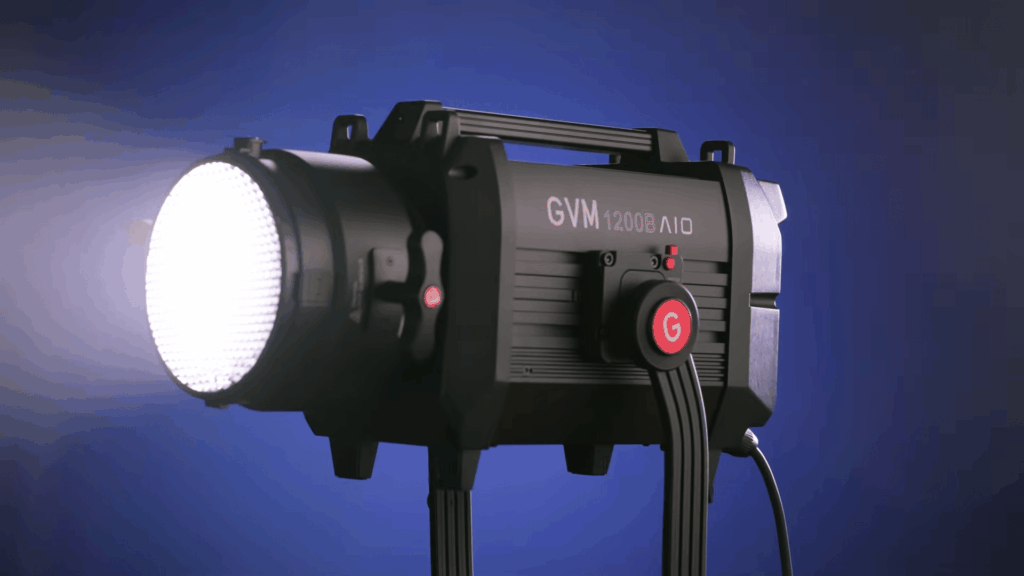
The Breakdown
- Ballast-Free Rigging: The integrated AC 100–240V body mounts on standard 28 mm Junior Pin hardware (Manual p.7).
- 8-Mode DMX/RDM: 2–8 ch in 8-bit or 16-bit, with four dimming curves, through the external data boxes.
- Cinema Output: 6,240 Lux @ 3m bare, or 25,700 Lux @ 3m with the standard reflector, at CRI 97+.
| Specchio | Detail |
|---|---|
| Power & Lux @ 1m | 1200W (110W Silent Mode cap) | @ 1m: Official N/A | 6,240 Lux @ 3m (Bare) / 25,700 Lux @ 3m (With Standard Reflector) |
| CCT & CRI / TLCI | 2700K–6800K Bi-Color | CRI ≥ 97 / TLCI 97 |
| Controllo | On-board LCD, Bluetooth Mesh (≤ 50 m), 5-core Mini XLR Data Port (DCB-XLR5 / CCB-XLR5 / LCB-RJ45), RDM, 2–8 ch |
| Montaggio | Standard Bowens S-Mount | 28 mm (1.125″) Junior Pin Yoke |
| Power & Weight | Integrated AC 100–240V (No Battery, Not Waterproof) | 12.5 kg w/ Yoke (10.6 kg Bare) |
Pro
- No separate ballast means one less box to hang and cable on the truss.
- Modular data boxes let you add 5-pin DMX/RDM, CRMX, or Art-Net/sACN as each job demands.
- 25,700 Lux @ 3m (with the standard reflector) has the punch to push through heavy diffusion.
Cons
- It’s a single head only: stand, reflector, softbox, and DMX data box are all extra. Also skip softboxes rated 700W or under, since they aren’t built for this output.
Working on a mid-size grid with 15A circuits? Step down to the GVM SD700B All-in-One below.
2. GVM SD700B AIO 700W Integrated DMX Bi-Color Studio Light: Best One-Cable 7.0 kg Truss & Multi-Cam Key
Il GVM SD700B All-in-One weighs 7.0 kg, sits on a 5/8″ Baby Pin receiver, and needs just one AC cord to put out 29,100 Lux @ 1m bare (26,200 Lux @ 3m with the standard reflector). Add a DCB-XLR5 o CCB-XLR5 for wired DMX/RDM, or group it over Bluetooth Mesh (up to 50 m).
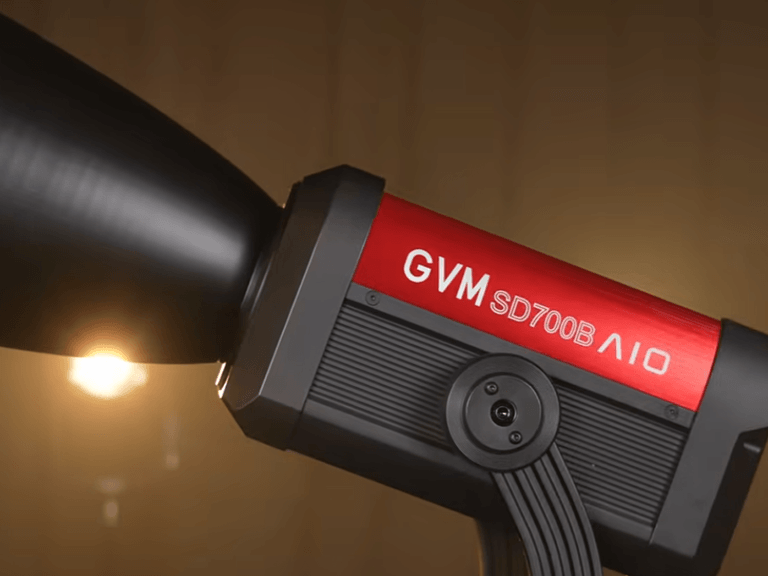
The Breakdown
- One-Cable Integrated Build: No external ballast to hang, whether it’s on a 5/8″ truss clamp or a rolling stand.
- 8-Mode DMX/RDM: The same 2–8 ch 8-bit/16-bit profiles and 110W Silent mode as the 1200B AIO.
- 15A Circuit Friendly: Two 700W units total 1,400W, which fits on a standard branch circuit.
| Specchio | Detail |
|---|---|
| Power & Lux @ 1m | 700W (110W Silent Mode cap) | 29,100 Lux @ 1m (Bare) / 26,200 Lux @ 3m (With Standard Reflector; @ 1m w/ Reflector: Official N/A) |
| CCT & CRI / TLCI | 2700K–6800K Bi-Color | CRI ≥ 97 / TLCI: Official N/A |
| Controllo | On-board LCD, Bluetooth Mesh (≤ 50 m), 5-core Mini XLR Data Port (DCB-XLR5 / CCB-XLR5 / LCB-RJ45), RDM, 2–8 ch |
| Montaggio | Standard Bowens S-Mount | 5/8″ Baby Pin Receiver |
| Power & Weight | Integrated AC 100–240V (No Battery, Not Waterproof) | 7.0 kg |
Pro
- The 7.0 kg head mounts cleanly on 5/8″ Baby Pin clamps.
- 29,100 Lux @ 1m (bare) is plenty to fill a parabolic softbox.
- Smooth 16-bit fades, with 110W Silent mode for when audio is rolling.
Cons
- AC mains only (no battery), and it ships bare: no reflector, stand, or DMX box.
Want 5-pin XLR DMX IN/OUT built into the ballast, plus the option to run on dual V-mount batteries (200W–250W cap)? Pair it with the GVM Pro SD650B Softbox Kit, which reaches 81,300 Lux @ 1m with the standard reflector at 6800K.
3. GVM PRO SD300C 300W RGB & Bi-Color Softbox Kit: Best Multi-Channel RGBWW Fixture for Console Cues & Set Washes
Il GVM PRO SD300C Softbox Kit has native 5-pin XLR DMX IN/OUT right on its 2.7 kg head, so it patches straight into a DMX512 chain with no adapter. Output is 13,100 Lux @ 1m bare, or 48,200 Lux @ 1m with the standard reflector. You get 18 DMX modes (2–13 ch), plus Mesh (up to 50 m) and RF (up to 30 m) when you’d rather go wireless.
The Breakdown
- Native 5-Pin XLR + RDM: Daisy-chain head to head, no dongles required.
- 18-Mode RGBWW Chart: 2–7 ch in 8-bit and 3–13 ch in 16-bit (
CCT&HSI/CCT&RGB), plus 60 Gels and 16 FX. - Softbox Kit: Comes with softbox, cover, 60V/5A AC adapter, clamp, and bag (no stand).
| Specchio | Detail |
|---|---|
| Power & Lux @ 1m | 300W (60W Silent Mode cap) | 13,100 Lux @ 1m (Bare) / 48,200 Lux @ 1m (With Standard Reflector) |
| CCT & CRI / TLCI | 2000K–10000K RGBWW + HSI + 60 Gels + 16 FX | CRI ≥ 97 / TLCI 97+ |
| Controllo | On-board LCD, Bluetooth Mesh (≤ 50 m), RF (≤ 30 m), Built-in 5-Pin XLR DMX IN/OUT + RDM (18 Modes, 2–13 ch) |
| Montaggio | Standard Bowens Mount | 5/8″ Baby Pin Receiver |
| Power & Weight | AC Only (DC 60V/5A Adapter Brick on U-frame V-Mount Slot; No Battery) | Head 2.7 kg (Kit 6.80 kg) |
Pro
- Built-in 5-pin XLR
DMX IN/OUTmeans no external box to buy. - 2000K–10000K RGBWW plus 60 Gels makes matching set colors easy.
- At 2.7 kg, the head hangs safely on a pipe grid.
Cons
- 300W suits 1.5–3.5 m throws, not 6 m grids. There’s no stand in the box, and it’s AC-only (the DC 60V/5A brick sits in the V-mount slot, so no batteries).
Need more punch? The GVM PRO-SD500B Softbox Kit steps up to 500W (16,800 Lux @ 1m bare / 61,600 Lux @ 1m with the standard reflector), with DMX/RDM on the ballast and dual V-mount power (200W–250W cap). Just note it’s not waterproof, so keep it indoors or under cover. For long overhead throws, anchor the grid with the GVM 1200B AIO instead.
DMX Control for Video Lighting FAQs
Q1: What is the difference between DMX512 and Bluetooth Mesh for studio video lights?
DMX512 gives you deterministic, interference-free fader control over cable, while Bluetooth Mesh trades that for fast wireless grouping of 2–6 lights. Wire 5-pin DMX512 (or CCB-XLR5 CRMX) on permanent overhead broadcast grids, and switch to Bluetooth Mesh (up to 50 m) when the set needs to move quickly.
Q2: How many DMX channels does a bi-color or RGBWW LED studio light use?
GVM bi-color fixtures use 2–9 DMX channels depending on 8-bit or 16-bit mode, while RGBWW models like the PRO SD300C use 2–13. Il 1200B All-in-One e SD700B AIO run 8 modes (2–8 ch), the PRO-SD650B/PRO-SD500B charts span 6–9 ch, and the PRO SD300C offers 18 modes up to 13 ch.
Q3: Can I use normal audio XLR microphone cables for a DMX lighting run?
No. Audio mic cables are 75–110 ohm, lack 5-pin DMX connectors, and distort 250 kbps digital pulses. Even with 3-to-5-pin adapters, that extra capacitance causes flicker over multi-light runs. Use proper 120-ohm 5-pin DMX cable and finish the line with a 120-ohm terminator.
Q4: How many GVM studio lights can fit in one DMX512 universe?
One RS-485 daisy-chain supports 32 physical fixtures, while one DMX512 universe holds 512 logical channels. At 8 channels per light, a single universe can address 64 fixtures. You just need to branch every 32 lights through an opto-isolated DMX splitter.
Final Takeaway: Pre-Shoot Checklist
- Verify DMX Addresses &
120ΩPlug: Make sure no start addresses overlap, each fixture is in the bit depth (8-bit or 16-bit) you patched, and the lastDMX OUThas a 120-ohm terminator in it. - Lock Kelvin & Shutter Speed: AWB off. Lock every camera to 5600K (or 4500K) with a 1/60s (NTSC) or 1/50s (PAL) shutter.
- Verify Silent Fan Wattage Caps: Switch to Silent mode before audio rolls (110W cap on
1200B/SD700B AIO; 60W cap on PRO heads). - Check Clamps & Breakers: Confirm 28 mm Junior or 5/8″ Baby Pin mounts, and spread the load across separate 15A/20A circuits.
Ready to build out your DMX512 studio grid or a multi-zone Mesh kit?