Three-point lighting is the foundational technique of professional photography, filmmaking, and video production — and it is entirely achievable at home with the right equipment and understanding. Whether you’re a YouTube creator, a portrait photographer, a live streamer, or a filmmaker building a home studio, mastering three-point lighting is the single most impactful technical skill you can develop. This guide covers everything from the basic definition to building the best three-point lighting setup at home in 2026, including affordable options for every budget.
Cos'è l'illuminazione a tre punti?
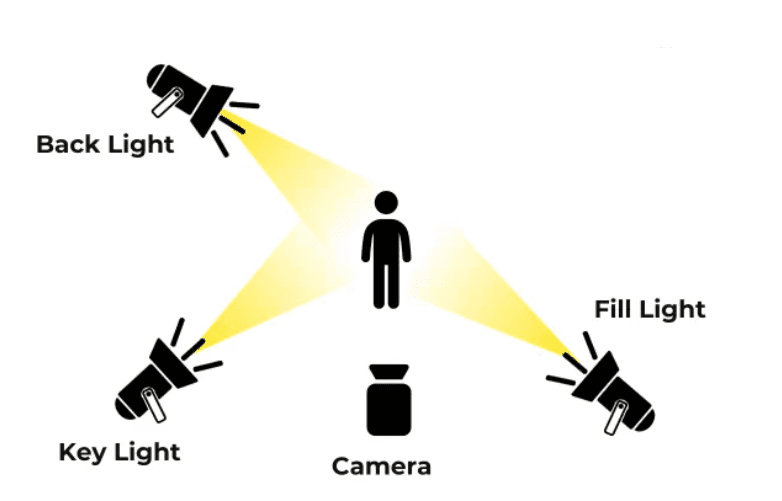
Three-point lighting is a standard method of illuminating a subject using three distinct light sources, each serving a specific purpose in the overall lighting design. The three lights are the key light, il luce di riempimento, and the back light (also called the hair light or rim light).
The key light is the primary and most powerful source. It is positioned to one side of the subject — typically at a 45-degree angle horizontally and slightly above eye level — and provides the main illumination. The key light defines the overall brightness of the scene, establishes the primary shadow direction, and creates the sense of dimensionality that separates professional-looking video from flat, amateur footage.
The fill light is placed on the opposite side of the subject from the key light, at lower intensity. Its purpose is not to illuminate — it is to control shadow. The fill light reduces the contrast between the lit and shadow sides of the subject’s face, preventing the harsh, unflattering deep shadows that a key light alone produces. The ratio between key and fill intensity determines the mood of the image: a low fill ratio creates dramatic, contrasty lighting; a high fill ratio produces soft, even commercial-style illumination.
The back light is positioned behind the subject, aimed back toward the camera. It separates the subject from the background by creating a thin rim of light along the hair, shoulders, or edges of the body. Without a back light, subjects visually merge into dark backgrounds — the three-dimensional depth that makes footage look cinematic collapses into a flat, two-dimensional image.
Together, these three sources create the complete, professional lighting look that viewers associate with high-production-value content across every visual medium.
Qual è lo scopo dell'illuminazione a tre punti?
The purpose of three-point lighting extends beyond simple illumination. Each element of the setup serves a distinct visual and psychological function that contributes to how the audience perceives and responds to the image.
Dimensionality. Flat, even lighting — like the output of a ring light directly in front of the subject — eliminates shadow entirely, making faces and objects appear two-dimensional. The angled key light of a three-point setup casts controlled shadows across the contours of the face, restoring the three-dimensional quality that makes subjects look real and present rather than flat and digital.
Subject separation. In any video or photography setup, the subject must be visually distinct from the background for the image to read clearly. The back light in a three-point setup creates this separation without requiring a physically distant or brightly lit background — critical for small home studios where background distance is limited.
Mood and tone control. By adjusting the ratio between key and fill, and by modifying the quality of each source (hard or soft), three-point lighting can produce any emotional register from warm and approachable to dramatic and authoritative. This flexibility makes it the go-to setup for content as varied as corporate interviews, YouTube vlogs, portrait photography, and cinematic narrative production.
Professional credibility. Audiences may not consciously identify three-point lighting when they see it, but they immediately perceive its absence. Videos shot with single-source or uncontrolled lighting read as amateur regardless of camera quality. Three-point lighting is the technical baseline that separates content worth watching from content that audiences abandon within the first thirty seconds.
Best Three-Point Lighting Setup: Product Spotlight — GVM PRO SD300B
For photographers and video creators building a professional three-point lighting setup, the anchor light — the key light — determines the quality ceiling of the entire system. The GVM PRO SD300B is purpose-built for exactly this role.
GVM PRO SD300B Full Specification Table
| Parametro | Specifiche | Three-Point Lighting Application |
|---|---|---|
| Modello | GVM PRO SD300B | — |
| Light Intensity | 65,700 lux @ 1m | Powerful key light output for any home studio size |
| Temperatura del colore | 2700K–6800K Bi-Colore | Match key and fill to any ambient light condition |
| Precisione del colore | CRI/TLCI ≥97+ | True skin tone and colour reproduction |
| Oscuramento | 0–100% Stepless | Precise key-to-fill ratio control |
| Cinematic Effects | 12 Built-in Presets | Fire, Lightning, TV flicker for creative setups |
| Light Source Simulations | 12 Presets | HMI, Halogen, Daylight, Sunset, Candlelight |
| Metodi di controllo | Knob / GVM App / DMX 5-pin / Bluetooth Mesh | Multi-light sync for full three-point control |
| Raffreddamento | Silenzioso | No fan noise interference on audio tracks |
| Flicker-Free | Sì | Clean footage at all shutter speeds and frame rates |
| Il migliore per | Film, Studio, Livestream, YouTube | Primary key light in any three-point setup |
At 65,700 lux at one metre, the GVM PRO SD300B delivers the raw output needed to serve as a dominant key light in home studios of any size — from small desk setups to full-room productions. Its 2700K to 6800K bi-color range allows you to match the key light’s colour temperature precisely to your fill source and any ambient light in the space, eliminating the mixed colour temperature problem that degrades so many home studio setups.
Il CRI/TLCI di 97+ ensures that skin tones, clothing colours, and set elements are reproduced faithfully at the key light position — where colour accuracy matters most, since this is the source providing the majority of your subject’s illumination. Below CRI 95, skin tone shifts and colour cast issues compound in post-production. At 97+, colours are accurate enough to require minimal grading correction.
Raffreddamento silenzioso is a non-negotiable feature for any light used in video production. Fan noise from lighting fixtures is one of the most common and most damaging audio problems in home studio recordings — it bleeds into dialogue, ruins interview audio, and cannot be fully removed in post-production. The SD300B’s silent cooling system eliminates this problem entirely.
Il 12 built-in light source simulations — including HMI 5600K, Halogen, Studio Lamp, Candlelight, Sunset/Sunrise, and Overcast Sky — allow the key light to be matched to the visual language of any scene without physical gels or post-production correction. For a home studio three-point setup, this means your key light can shift from a clean interview look to a cinematic golden hour aesthetic to a cool, contemporary daylight style in a single button press.
Rete Bluetooth Mesh synchronises multiple GVM lights simultaneously from the GVM app — allowing you to adjust key, fill, and back light intensity, colour temperature, and effects from your phone without walking to each fixture between shots. For solo creators managing a three-point setup alone, this remote multi-light control is a significant practical advantage.
Three-Point Lighting at Home: How to Set It Up
Building a functional three-point lighting setup at home does not require a dedicated studio space. A bedroom, living room, or home office can be configured for professional results with thoughtful light placement and the right equipment.
Step 1 — Position your key light. Place your primary light source at 45 degrees to one side of your subject and slightly above eye level — approximately 30 to 45 degrees above the horizontal. For a seated talking-head setup, this typically means the light is positioned at roughly head height on a standard light stand. The key light should be your brightest source. Attach a softbox or diffusion modifier to produce soft, flattering light that wraps around the subject rather than creating harsh, point-source shadows.
Step 2 — Add your fill light. Position the fill light on the opposite side of the subject from the key, at the same distance or slightly further away, and reduce its intensity to between 30% and 60% of the key light’s output. For a natural, professional look, a fill-to-key ratio of approximately 1:2 works well for most YouTube and interview content. For a more dramatic, cinematic look, reduce the fill to 1:4 or lower.
Step 3 — Set your back light. Position the back light behind the subject, aimed forward and slightly downward toward the hair and shoulders. The goal is a thin, defined rim of light on the subject’s edges — not a broad flood of background illumination. A harder light source without diffusion works best for the back light position, as the defined edge it creates reads more clearly on camera than a soft, diffused source.
Step 4 — Check colour temperature consistency. All three lights should be set to the same colour temperature before shooting. With bi-color fixtures like the GVM PRO SD300B, this is straightforward — set all units to the same Kelvin value via the app. Colour temperature inconsistency between key, fill, and back light is immediately visible in skin tone and creates white balance problems that cannot be fully corrected in post.
Step 5 — Control your ambient light. In a home studio, ambient light — from windows, overhead fixtures, and lamps — constantly competes with your three-point setup and introduces unpredictable colour casts. Close blinds or curtains to control natural light, and turn off overhead room lighting. Let your three-point setup be the sole light source in the space.
Cheap Three-Point Lighting: Budget-Friendly Options That Work
Un professionista three-point lighting result does not require professional-level spending. Here is how to build a functional setup at every budget tier.
Under $150 — Entry level: Two adjustable LED panels (CRI ≥95, bi-color) as key and fill, plus a small LED panel or practical lamp as back light. Look for panels with adjustable colour temperature and stepless dimming. Avoid panels below CRI 90 — the colour accuracy difference is immediately visible in skin tones.
$150–$400 — Mid range: One quality COB monolight or high-output LED panel as key light, a smaller LED panel as fill, and a compact LED fixture for back light. At this tier, bi-color control, app connectivity, and silent cooling become available — features that meaningfully improve the quality and usability of the setup for regular shooting.
$400+ — Professional home studio: A flagship COB key light like the GVM PRO SD300B provides the output, colour accuracy, and control sophistication of a professional studio in a home environment. Pair with two smaller bi-color panels for fill and back light positions, controlled simultaneously via Bluetooth Mesh from a single app.
Regardless of budget, the most impactful cheap three-point lighting upgrade is always modifier quality. A $30 softbox on a $60 LED panel produces dramatically better key light quality than a bare $200 fixture. Invest in diffusion early — it changes the character of your light more than any other single variable.
Pensieri finali
Three-point lighting is not a technique reserved for professional studios — it is a fundamental visual language that any photographer or video creator can implement at home with the right understanding and equipment. A quality key light like the GVM PRO SD300B, combined with a controlled fill source and a simple back light, transforms the visual quality of any home studio setup immediately and measurably. Master the principles, invest in one quality anchor light, and build your setup intentionally — your audience will notice the difference from the very first frame.