A strong on-camera performance is not always about memorizing every line.In interviews, educational videos, corporate presentations, livestreams, and studio productions, the real challenge is often maintaining a natural connection with the camera while delivering accurate information. A speaker may know the subject well and still lose rhythm, skip an important point, or glance away from the lens when checking notes.
This is where a prompter cue becomes a useful production tool.A teleprompter places the script directly along the camera’s optical path, allowing the presenter to follow the content while maintaining a more consistent eye line. The result is not simply fewer forgotten lines. When properly set up, it can change the rhythm of an entire shoot: fewer interruptions, fewer unnecessary retakes, and more attention directed toward the delivery itself.
In this article, we’ll look at how to use a prompter cue effectively and where the GVM TQ-L fits into a modern video workflow.
Table of Contents
Why a Prompter Cue Can Improve On-Camera Communication?
There is a common assumption that using a teleprompter makes a presentation look scripted. In practice, the opposite can be true.
When speakers rely entirely on memory, they often concentrate so heavily on recalling the next sentence that their delivery becomes stiff. A well-prepared prompter cue reduces that mental load. Instead of searching for the next point, the presenter can focus on pacing, emphasis, expression, and eye contact.
The key is not to read the script word for word with the same rhythm.
Think of the prompter as a guide rather than a substitute for performance.
For example, a long corporate message may be easier to deliver when broken into short visual paragraphs. Important words can be isolated. Natural pauses can be built into the script. The text should support the speaker’s rhythm instead of forcing the speaker to chase the scrolling screen.
This is especially valuable when recording content that needs to be precise, such as product demonstrations, educational material, financial presentations, or technical explanations.
Introducing the GVM TQ-L for Professional Prompter Cue Workflows
The GVM TQ-L is designed for productions that need a larger, more professional teleprompting setup rather than a small, camera-mounted solution.
Its 18-inch teleprompter design provides a substantial reading area, while the official specifications highlight a reading range of up to 15 feet (4.6 meters). This can be useful for studio interviews, presentations, corporate productions, broadcast-style content, and other setups where the camera is positioned farther from the speaker.
One of its practical strengths is the combination of a large reflective display and wide-angle compatibility. Wide shots can be difficult with some teleprompter designs because the edges of the hood or glass assembly may enter the frame. The TQ-L is designed to support wide-angle shooting while maintaining an unobstructed field of view.
That creates more freedom in how a scene is composed.
A presenter no longer has to be limited to a tight head-and-shoulders shot simply because a prompter is positioned in front of the camera.
Optical Alignment Matters More Than It First Appears
A good teleprompter is not only about displaying readable text.
The relationship between the screen, reflective glass, camera lens, and presenter determines whether the audience feels that the speaker is actually looking at them.
GVM describes the TQ-L‘s optical design as a “three points and one line” alignment system intended to keep the presenter’s eye line closely aligned with the camera lens. The purpose is straightforward: reduce visible eye movement while reading and create a more stable, direct on-camera presence.
The teleprompter also uses professional spectroscopic glass for script reflection while allowing the camera to record through the glass. Earlier GVM technical information describes a 70/30 beam-splitter design with AR coating intended to reduce ghosting and flare.
In practical terms, this means the prompter should support two things at the same time:
The presenter needs to read comfortably.
The camera needs a clean path to the subject.
When those two requirements are balanced correctly, the equipment becomes less visible in the final production. The audience simply sees a speaker who appears focused and engaged.
Build the Prompter Into the Camera Setup
A teleprompter works best when it is considered part of the camera system from the beginning.
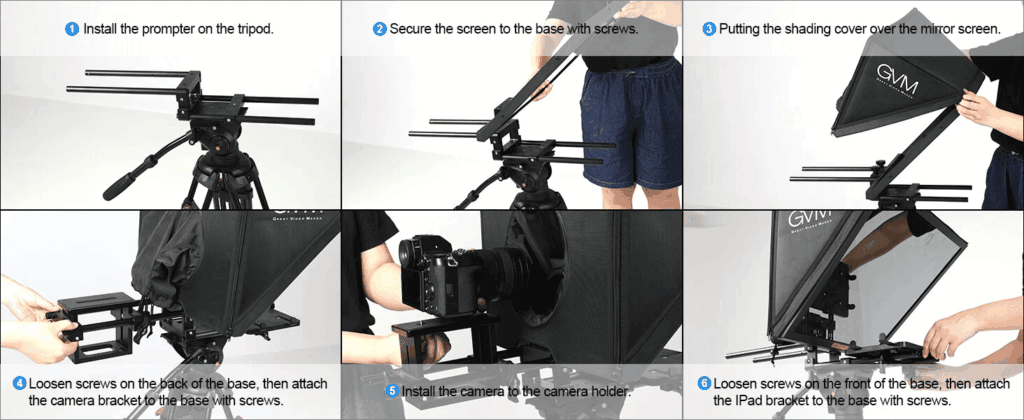
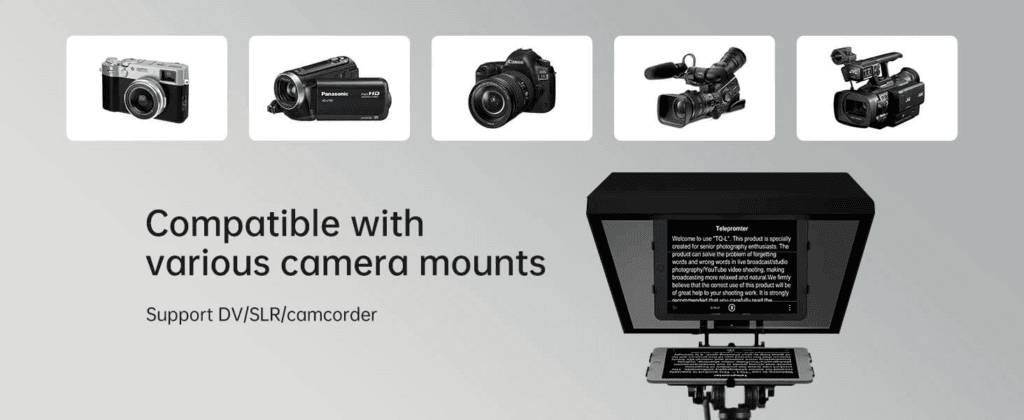
The GVM TQ-L uses a modular construction that includes the teleprompter body, reflective screen, tablet holder, camera bracket, hood, and Bluetooth remote. Its design supports a range of camera systems, including DSLR, DV, camcorder, and other professional recording equipment.
The earlier TQ-L specifications also describe support for phones and iPads/tablets, adjustable camera positioning, and compatibility with different production configurations.
This matters because camera setups are rarely identical.
A compact mirrorless camera may require a different height and balance point than a larger video camera. The ability to adjust the physical setup makes it easier to keep the lens centered behind the reflective glass.
Before recording, take a few minutes to check three things:
First, center the lens behind the glass.
Small alignment errors can affect the speaker’s apparent eye contact.
Second, position the script at a comfortable reading size.
Larger text generally reduces unnecessary eye movement.
Third, test the framing with the final lens.
This is particularly important when using wider focal lengths.
These simple checks can prevent problems that are difficult to fix later in editing.
A Prompter Cue Can Change the Pace of a Production
The value of a teleprompter often becomes clear after a long recording session.
Without one, a short mistake can send the production back several paragraphs. The speaker checks notes, the camera stops, and the rhythm disappears. This process may repeat throughout the day.
With a well-organized prompter cue workflow, the script remains directly in front of the presenter. Corrections can be made quickly, and the speaker can maintain a more consistent performance from take to take.
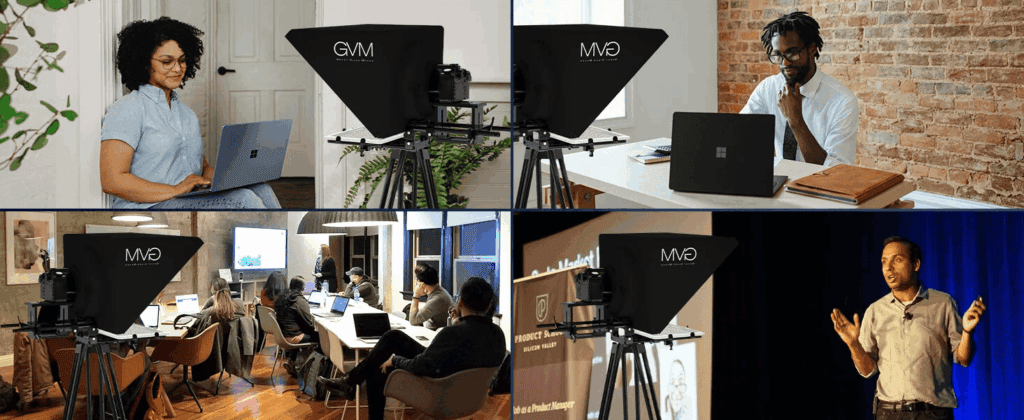
GVM positions the TQ-L as a tool for studio, broadcast, YouTube, corporate, and presentation environments, with the goal of reducing preparation time and streamlining script delivery.
That is an important distinction.
A teleprompter does not necessarily make someone a better presenter. What it can do is remove one unnecessary obstacle from the process. The speaker can spend less energy remembering the exact wording and more energy communicating the message.
For many productions, that is where the real efficiency comes from.
| Feature | GVM TQ-L Teleprompter |
| Best For | Professional Video Production, Studio Recording, YouTube, Interviews & Broadcasting |
| Product Type | Professional Teleprompter for Cameras, Smartphones & Tablets |
| Screen Size | 18″ Large Beamsplitter Display |
| Device Compatibility | Supports Smartphones & Tablets up to 12.9″ |
| Camera Compatibility | DSLR, Mirrorless Cameras, Camcorders & Professional Video Cameras |
| Optical System | 70/30 Beamsplitter Glass with Anti-Reflective Coating |
| Reading Experience | Clear Text Reflection with Reduced Ghosting & Flare |
| Control Type | iOS / Android APP Control + Bluetooth Remote Control |
| Smart Features | Adjustable Font Size, Scroll Speed, Background Color & Playback Control |
| Lens Compatibility | Supports Wide-Angle Lenses with Large Lens Opening |
| Portability | Modular Design with Easy Assembly & Professional Setup |
| Material | Durable Aluminum Alloy Construction |
| Product Weight | Approx. 5kg |
| Load Capacity | Supports Cameras & Accessories up to 10kg |
| Product Size | 575 × 415 × 380 mm |
| Special Advantage | Professional Eye-Contact Shooting Experience Without Memorizing Scripts |
| Application Scenarios | Studio, Online Courses, Interviews, Presentations, Live Streaming & Content Creation |
| Main Benefit | Improves Presentation Confidence and Streamlines Video Production Workflow |
Final Thoughts
A professional prompter cue setup is ultimately about preserving connection.
The script may sit between the speaker and the camera, but the audience should never feel that separation. When the text size is appropriate, the scrolling speed matches the speaker, and the optical alignment is correct, the technology begins to disappear into the workflow.
The GVM TQ-L brings together an 18-inch teleprompter format, wide-angle support, professional reflective glass, APP and Bluetooth control, modular assembly, and broad camera compatibility. These features make it suitable for creators who need more than a compact teleprompter and want a setup that can move between studio, corporate, broadcast, and larger production environments.
The best teleprompter setup does not call attention to itself.
It leaves the viewer with something more valuable: the feeling that the person on screen is speaking directly to them.
Explore the full range of GVM professional lighting solutions(https://gvmled.com/)today