A professional teleprompter is essential for digital content creators today in 2016, serving as the key to transitioning from amateur vlogs to professional-grade productions. In the fast-paced world of YouTube, your ability to communicate clearly, maintain eye contact, and project confidence is paramount—and that is exactly where a high-quality Android teleprompter comes into play. While memorizing a 10-minute script is an exhausting task that often leads to countless retakes and frustrating editing, using a dedicated teleprompter for YouTube videos ensures your delivery is flawless every time.
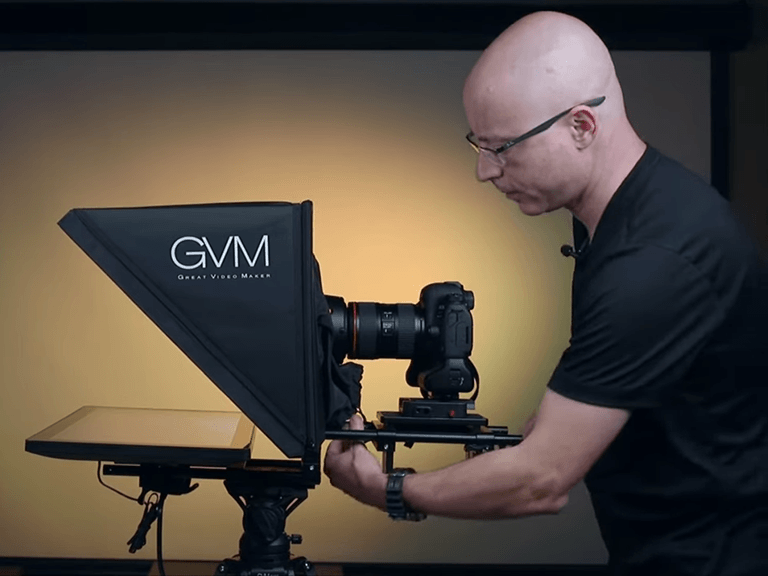
In this ultimate guide, we are going to explore how to leverage the power of an Teleprompter to professionalize your workflow. Whether you are filming in a high-end studio or using your smartphone in your bedroom, understanding the technology behind the best Android teleprompter solutions will transform your channel’s production value instantly.
what is a teleprompter
To truly master your video delivery, we must first answer a foundational question: what is a teleprompter?
At its most basic level, a teleprompter (often called an “autocue”) is a display device that prompts the person speaking with an electronic visual text of a speech or script. Historically, these were bulky machines used in television studios. They consisted of a monitor reflecting text onto a sheet of “beamsplitter glass” placed directly in front of the camera lens. This allowed news anchors to read the news while looking directly at the viewers at home.
Today, the definition of what is a teleprompter has evolved significantly to match the needs of the “prosumer” market. In the modern creator economy, it can refer to three different things:
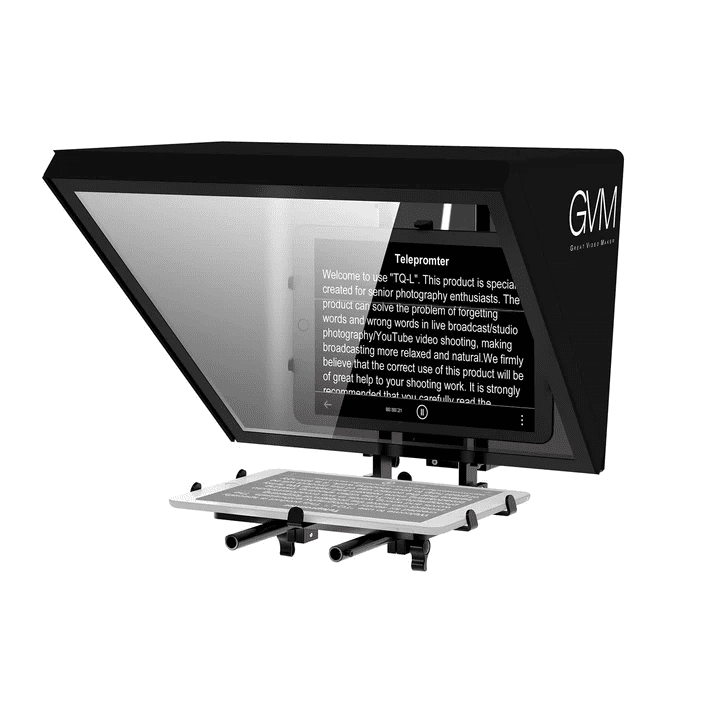
- Hardware Glass Rigs: These are hoods that fit over your DSLR or Mirrorless camera lens. You place a tablet or an Android phone inside the tray, and it reflects the text onto the glass. You read the reflection while the camera lens shoots through the glass from behind.
- Software Apps: These are mobile applications found on the Google Play Store. They turn your phone screen into a scrolling script. This is the most common use of an Android teleprompter for modern vloggers.
- Floating Overlays: Specialized software that allows your script to “float” in a small, transparent window over other apps, such as your native camera app or a video conferencing tool like Zoom.
The core benefit remains the same regardless of the hardware: it allows you to read your lines word-for-word without breaking the “invisible string” of eye contact with your audience.
Why is using a teleprompter for youtube videos such a massive trend right now? The answer lies in audience retention and perceived authority. When you look at your notes or look off to the side to read a script taped to the wall, you break the connection with the viewer. In the “Attention Economy,” a two-second distraction is enough for a viewer to click away.

Youtube video recording teleprompter
For the modern solo creator, a standard text scroller is often not enough. You need a video recording teleprompter—a specialized category of application that combines the camera’s recording interface with the scrolling script on a single screen. This “all-in-one” approach is the most efficient way for YouTubers to produce high-quality talking-head content without needing a secondary camera operator.
Using a video recording teleprompter app on your Android device offers several unique technical advantages:
- Front-Facing Camera Integration: These apps allow you to see your own reflection while the text scrolls. This is vital for checking your framing, lighting, and facial expressions in real-time.
- Manual Camera Controls: A high-end video recording teleprompter will give you “Pro Mode” settings. You can manually lock the white balance, ISO, and shutter speed. This prevents the “flickering” effect that often happens when the camera’s auto-exposure reacts to the changing light of the scrolling white text.
- Audio Waveform Display: Since you are recording both video and audio within the same interface, a professional video recording teleprompter will show a live audio meter. This ensures your external microphone is working perfectly before you spend 20 minutes recording a long script.
- Mirroring for Hardware Rigs: If you decide to move from a “phone-only” setup to a professional glass rig, most video recording teleprompter apps include a “Mirror” or “Horizontal Flip” toggle. This ensures the text appears correctly when reflected onto a beamsplitter glass.
Why Choose a Dedicated Video Recording Teleprompter App?
While you could technically use two separate devices—one for the script and one for the camera—a video recording teleprompter simplifies the process into a “one-tap” workflow. Once you finish your take, many of these apps allow you to trim the beginning and end of the clip, add your social media handles as an overlay, and even generate automatic captions based on your script.
Whether you are filming a quick YouTube Short or a 20-minute deep dive, the video recording teleprompter is the backbone of a modern, fast-moving content studio. By keeping your script, your camera, and your audio monitoring in one place, you can spend less time fumbling with gear and more time connecting with your audience.
teleprompter for macbook&android
In a professional studio environment, creators often use a hybrid setup. You might write your long-form scripts on your laptop because typing on a physical keyboard is much faster, but you want to use your Android smartphone as the actual display device because of its portability. This is where a teleprompter for macbook&android workflow becomes incredibly efficient.
The best way to manage a teleprompter for macbook&android setup is through cloud integration:
- Script Syncing: Use a service (like Google Drive or a dedicated prompter cloud) where you can type your script on the Macbook and have it instantly appear in the teleprompter app on your Android device.
- Remote Control Functionality: Some advanced software allows you to use your Macbook as a remote control via Bluetooth or Wi-Fi. While you stand in front of the camera, you can use your laptop’s spacebar to play/pause the script or the arrow keys to adjust the speed on the Android screen.
- External Display Mode: You can also use apps that turn your Android tablet into an external monitor for your Macbook. You can then drag a browser-based teleprompter window onto the Android screen, giving you a massive, clear display for your lines.
By treating your teleprompter for macbook&android as a unified system, you reduce the “friction” of getting from a blank page to a finished video.
video with teleprompter free
For beginners who are just starting their YouTube journey and haven’t monetized their channel yet, spending $50 or $100 a year on a software subscription might not be feasible. Finding a way to record video with teleprompter free of charge is the first step for many.
However, you should be aware of the “freemium” limitations. When you search for video with teleprompter free options on the Google Play Store, you will typically find:
- The Watermark Issue: Most free apps will add a large, distracting logo to your exported video. To bypass this, a common “creator hack” is to use a “floating” teleprompter app over your phone’s native camera app. Since you aren’t recording inside the prompter app, there is no watermark on your file.
- Character Limits: Many free versions only allow you to upload scripts of a certain length (e.g., 500 or 1,000 characters). This is fine for YouTube Shorts or TikToks, but not for long-form essays.
- Manual Speed Only: You often lose out on voice-tracking features in free versions, meaning you’ll have to practice your timing to match a pre-set scroll speed.
A great way to get a video with teleprompter free setup is to use an open-source web scroller. You can open the website in your mobile browser, set it to “Auto-scroll,” and use the Android “Split Screen” feature to have your camera open at the same time.
How to Use a YouTube Video Teleprompter
Setting up your youtube video teleprompter correctly is the secret to a natural, professional performance. Follow these 5 steps to master your delivery and keep your audience engaged:
- Distance (The 5-Foot Rule): Stand at least 5 to 7 feet away from the screen. This distance minimizes visible eye movement, making it nearly impossible for the camera to detect that you are reading.
- Eye-Level Alignment: Ensure the camera lens and the scrolling script are perfectly aligned at eye level. This ensures you are looking directly “at” your viewers rather than at the ceiling or the floor.
- Narrow the Margins: Don’t let your text stretch across the whole screen. In your youtube video teleprompter app, set the text column to about 2-3 inches wide in the center. This keeps your pupils focused on the lens.
- High-Contrast Formatting: Use a clean, Sans-Serif font (like Arial) with white text on a black background. This reduces eye strain and prevents screen light from reflecting onto your face or glasses.
- Natural Performance: Treat the script as a conversation. Use hand gestures and varied vocal inflections. A great youtube video teleprompter user sounds like they are talking to a friend, not reading a manual.
By mastering these positioning techniques, your youtube video teleprompter becomes a seamless tool for delivering high-quality, professional content every time.
Conclusion: Mastering Your Android Teleprompter Workflow
In the modern age of video, the teleprompter has moved from the newsroom to the bedroom studio. Whether you are looking for the best Android teleprompter for YouTubers or simply trying to figure out how to stop stuttering during your Vlogs, the goal is always the same: Higher Production Value.
The teleprompter is not a “cheat code”—it is a professional tool that frees up your brain to focus on how you say things (your tone, your energy, and your hand gestures) rather than worrying about what you have to say next. By choosing the right teleprompter with video audio best settings and integrating your teleprompter for macbook&android, you are investing in the long-term success of your channel.
Stop memorizing. Stop stuttering. Start filming with the confidence of a professional broadcaster. Whether you go with a video with teleprompter free app or a high-end hardware rig, your audience will notice the difference in the clarity and flow of your very next upload. Happy filming!