Reading from a script should not make a video feel scripted.For interviews, tutorials, livestreams, product demonstrations, and solo productions, the challenge is often not writing the right words. It is delivering them naturally while keeping your eyes on the camera, maintaining a steady pace, and staying focused on the performance.
A well-designed teleprompter para cámara can take much of that friction out of the process. But choosing and using one effectively requires more than simply finding a screen large enough to display text.
So, what actually makes a teleprompter useful? And how can creators build a workflow that feels natural rather than mechanical?
Tabla de contenidos
What Makes a Good Teleprompter Setup?
A teleprompter has one simple job: keep the script visible without pulling the presenter’s attention away from the lens.
In practice, several factors determine how well it does that.
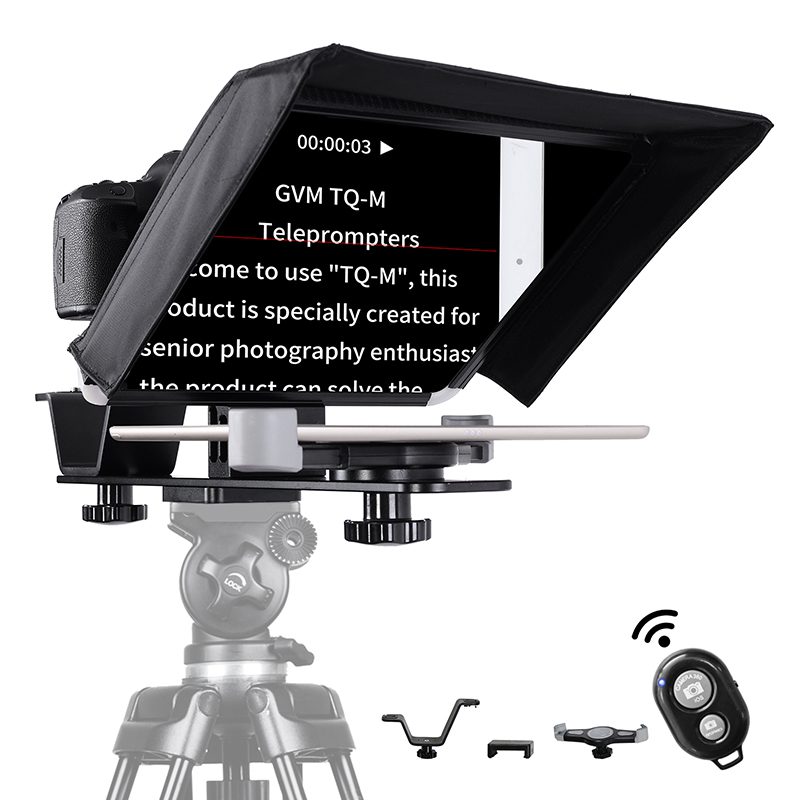
A Clear and Comfortable Reading Area
If the text is too small or the viewing area is limited, presenters constantly have to search for their place. That can lead to pauses, missed lines, and noticeable eye movement.
A larger display gives the presenter more room to read at a comfortable pace. It also reduces the need to move the eyes excessively across the screen.
For longer interviews or educational videos, this becomes particularly important. The less attention spent on finding the next line, the more attention remains available for delivery.
Camera Compatibility Matters
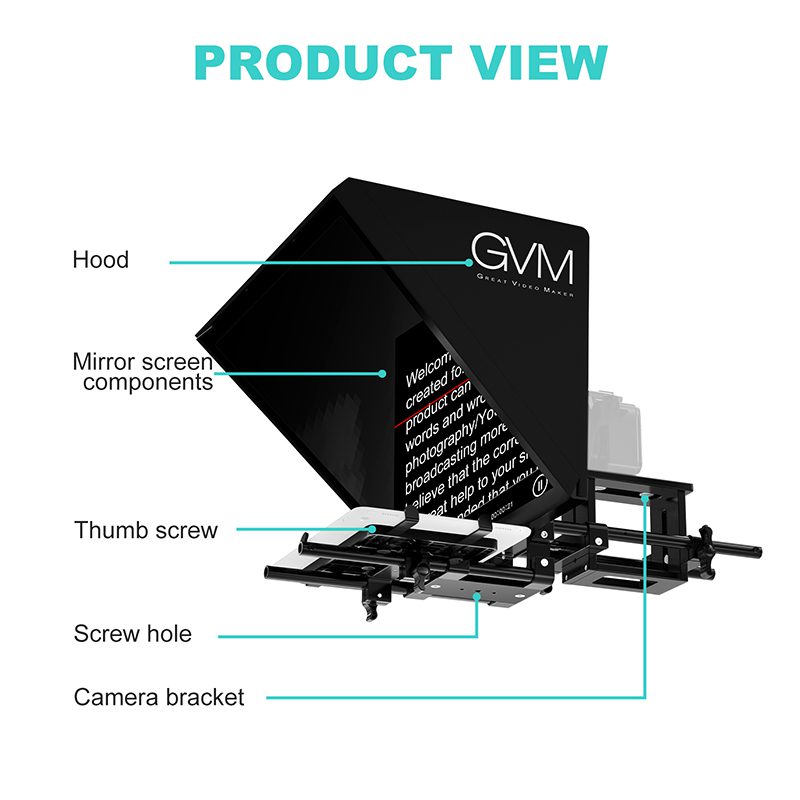
A teleprompter is positioned directly in front of the camera, so the relationship between the lens, reflective glass, and display is critical.
A practical setup should allow the presenter to maintain eye contact with the lens while still seeing the script clearly. Wide-angle shooting also deserves attention. If the camera uses a wider field of view, the teleprompter should not unnecessarily restrict the framing.
This is one reason a teleprompter para cámara should be considered part of the camera system rather than an isolated accessory.
Control Should Not Interrupt the Take
Changing the script speed or text size sounds like a minor adjustment. During a solo production, however, even a small adjustment can mean leaving the camera position, stopping the recording, and resetting the shot.
Remote control changes that workflow.
A wireless controller or smartphone-based control system allows the operator to adjust the script while remaining behind the camera. The result is a smoother production process, particularly when there is no dedicated camera operator or assistant.
How to Prepare a Script for a Teleprompter
A teleprompter does not automatically make a script easier to deliver.
The way the script is written matters just as much.
Write for Speaking, Not Reading
A sentence that looks perfectly reasonable on paper may feel awkward when spoken aloud.
Keep sentences relatively direct. Use natural pauses. Avoid packing several ideas into one long paragraph.
Instead of writing:
“The following section will provide an overview of the primary features and explain how they can be applied during your production workflow.”
A presenter might naturally say:
“Let’s look at the main features first. Then we’ll see how they fit into a real production.”
The second version is easier to read, easier to remember, and usually sounds more natural on camera.
Give the Presenter Room to Breathe
Do not fill every inch of the teleprompter screen with text.
Shorter lines and sensible spacing make it easier to maintain a consistent reading rhythm. They also give presenters visual landmarks, allowing them to anticipate what comes next without constantly scanning the screen.
The goal is not to read as quickly as possible. It is to make the words disappear into the performance.
Match the Scroll Speed to the Presenter
There is no universal “correct” teleprompter speed.
Some presenters speak quickly. Others pause frequently or emphasize individual phrases. A useful setup should therefore allow the scrolling speed to be adjusted during the recording.
This becomes especially valuable when moving between different types of content. A product demonstration, for example, may require a slower pace than a short promotional introduction.
GVM TQ-MB: Designed for Modern Solo Creators
For creators who need a teleprompter para cámara without building an elaborate studio rig, the GVM TQ-MB takes a practical approach.
It combines a 12-inch HD reflective display, premium beam-splitter glass, smartphone and tablet compatibility, and wireless control in a portable teleprompter system. The large viewing area is designed to keep scripts easy to read while allowing the presenter to maintain direct eye contact with the camera.
The workflow is equally important.
With the GVM Teleprompter App, a smartphone can function as a wireless control interface. Users can adjust scrolling speed, font size, and text spacing in real time without repeatedly returning to the camera. The included Bluetooth remote also supports remote adjustment of scrolling speed, text size, and mirroring on iOS and Android devices.
For a one-person production, that means fewer interruptions and less equipment to manage.
En TQ-MB also supports a streamlined camera rig through its dual cold shoe mounts. Combined with its custom protective carrying case, the system is designed to move between studio, location, and outdoor productions without turning transportation into another part of the production problem.
| Característica | GVM TQ-MB |
| Mejor para | Live Streaming, Interviews & Video Production |
| Display | 12″ HD Reflective Display |
| Compatibility | Smartphones & Tablets up to 22cm Wide |
| Camera Compatibility | Mirrorless, DSLR & Camcorders |
| Control Type | GVM App & Bluetooth Remote |
| App Control | Scroll Speed, Font Size & Text Spacing |
| Remote Functions | Speed, Text Size & Mirroring |
| Optical System | Premium Beam-Splitter Glass |
| Mounting | Dual Cold Shoe Mounts |
| Material | Aluminum Alloy |
| Max Load | 5KG |
| Peso | 1.65KG |
| Portabilidad | Foldable & Protective Carrying Case |
The Real Advantage: Better Eye Contact
The most useful feature of a teleprompter is not necessarily its display size or its remote control.
It is what happens when those features work together.
When the script is easy to read and simple to control, the presenter no longer needs to choose between remembering every line and looking at the camera. The words sit close to the lens, while the performance remains the focus.
That subtle difference can change the character of a video.
The audience may never notice the teleprompter. Ideally, that is exactly what happens.
In Conclusion: Let the Technology Stay Out of the Way
A good production tool should solve a problem without creating another one.
For creators working alone, that means portability, clear visibility, simple control, and a setup that can be assembled without unnecessary equipment. For professional productions, it means consistency and a more reliable way to keep presenters focused.
En GVM TQ-MB follows this philosophy by combining a large 12-inch HD prompting display, wide-format camera workflow, app and Bluetooth control, accessory mounting, and portable storage into one practical system.
El mejor teleprompter para cámara is not the one that makes the presenter look like they are reading.
It is the one that gives them enough support to forget they are reading at all.
Explore the full range of GVM professional lighting solutions(https://gvmled.com/)today