When filming a presentation, interview, tutorial, or live segment, keeping the delivery natural can be surprisingly difficult. A presenter may know the subject well but still lose rhythm when trying to remember exact wording, key figures, or a long sequence of points.
This is where an autocue teleprompter becomes useful. Rather than asking the presenter to memorize every line, a teleprompter keeps the script close to the camera’s line of sight. The result is a more consistent delivery while allowing the speaker to maintain natural eye contact with the lens.
For solo creators and small production teams, the real advantage is not simply displaying text. It is creating a smoother workflow from preparation to recording.
Tabla de contenidos
How to Improve Video Production with an Autocue Teleprompter?
If you want to make your videos more structured without making the presentation feel overly rehearsed, a teleprompter can become an important part of the setup.
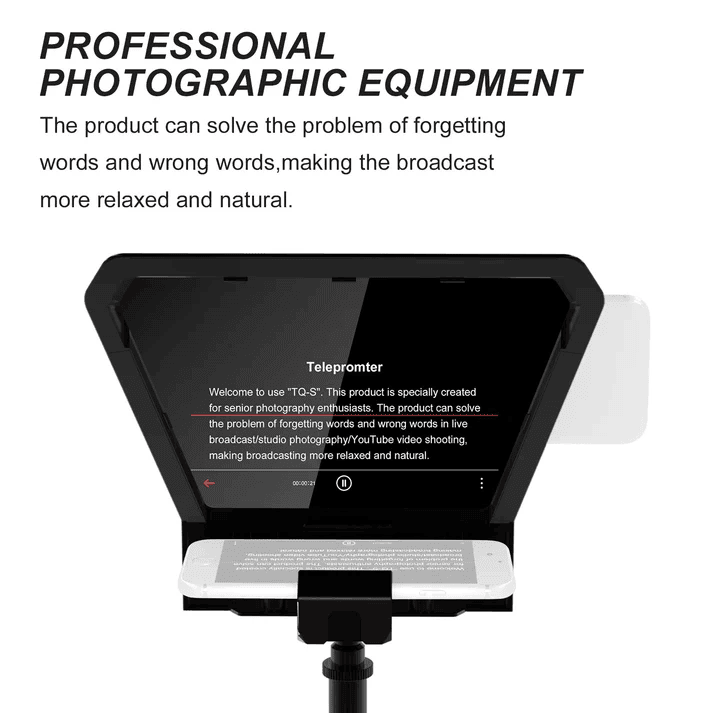
The basic principle is straightforward: the script is displayed on a phone or tablet and reflected through the teleprompter glass toward the presenter. The camera remains behind the glass, so the presenter can read while continuing to look toward the lens.
This is particularly helpful when the content includes technical explanations, product information, interviews, or educational material. Instead of repeatedly stopping to check notes, the presenter can keep moving through the script.
A well-designed setup should also avoid creating new problems. The teleprompter needs to support the camera properly, provide enough viewing space for the script, and remain compatible with the lens being used.
Let us take the GVM TQ-M as an example and look at several factors that matter when choosing an autocue teleprompter.
1. Basic Setup
The first step is mounting the teleprompter securely to the camera rig.
A useful teleprompter should not require a complicated assembly process every time it is used. A modular structure allows the main components to be arranged according to the camera and shooting environment.
En GVM TQ-M uses a lightweight aluminum alloy structure with tool-free locking knobs. Its modular design includes the mirror screen, shading cloth, tablet clip, and multiple 1/4″ and 3/8″ mounting points. This makes it possible to adapt the rig rather than rebuild the entire setup for every shoot.
The next consideration is the display device. The TQ-M supports smartphones and tablets, with an adjustable tablet clip designed for devices up to 10.5 inches. Once the device is positioned behind the beamsplitter, the script can be reflected directly toward the presenter.
For a solo creator, this small adjustment can make a noticeable difference. There is no need to keep looking down at a separate monitor or printed script.
2. Notable Features
Once the basic setup is complete, the quality of the teleprompter itself becomes more important. Several details directly affect how comfortable the system is during production.
✓ Lightweight Modular Construction
A teleprompter is often moved between rooms, studios, and locations. Excess weight quickly becomes inconvenient when it is combined with a camera, lens, tripod, and other accessories.
The TQ-M uses a compact aluminum alloy construction while retaining a modular mounting system. The structure is designed to remain practical for mobile production without sacrificing the flexibility needed for different camera rigs.
✓ Up to 10KG Payload
Weight capacity is another important consideration, particularly for professional cameras and fully built-out rigs.
En GVM TQ-M supports up to 10KG of camera equipment. Its 1/4″ and 3/8″ mounting options allow it to accommodate configurations ranging from smaller cameras to more substantial cinema setups.
A stronger mounting platform gives the operator more room to build a rig around the teleprompter instead of having to simplify the camera setup.
✓ Wide-Angle Lens Compatibility
One common issue with teleprompters is vignetting when a wide-angle lens is used. If the glass or housing enters the camera’s field of view, the edges of the image can become compromised.
The TQ-M uses a multi-layer dielectric hard-coated beamsplitter designed to reduce reflection and light loss while supporting wide-angle lenses such as 16–35mm. This helps maintain a clean, full-frame image without unwanted edge interference.
For interviews and presenter-led content, this matters more than it may seem. A wider lens often makes it easier to work in smaller spaces, so teleprompter compatibility should not limit lens selection.
✓ Natural Eye Contact
Good teleprompter design is less about making the script visible and more about making the reading position feel natural.
Because the reflected text sits close to the camera’s optical axis, the presenter can read the script while continuing to face the lens. This helps preserve eye contact, which is especially important for educational videos, corporate presentations, interviews, and direct-to-camera content.
The goal is simple: the audience should feel that the presenter is speaking to them, not reading from a page.
3. Value-Added Functions
Un autocue teleprompter becomes even more useful when the control system is considered alongside the hardware.
En GVM TQ-M supports GVM’s mobile app on iOS and Android. Users can adjust font size, scrolling speed, background color, and mirror mode directly from the app.
Bluetooth control provides another layer of convenience. The included Bluetooth remote can be used to play or pause the script, turn pages, and adjust text or background settings without reaching toward the tablet.
This is particularly practical for solo production. When the camera is already recording, even a small adjustment can interrupt the flow of a presentation. Remote control keeps those changes within reach.
The broader lesson is that teleprompter performance depends on more than the glass itself. Mounting stability, lens compatibility, display size, script control, and operator convenience all influence the final result.
An effective setup should almost disappear once recording begins.
| Característica | GVM TQ-M |
| Mejor para | YouTube, Live Streaming, Interviews, Education & Presentations |
| Payload Capacity | Up to 10KG |
| Device Compatibility | Smartphones & Tablets up to 10.5″ |
| Camera Compatibility | DSLR, Mirrorless, Camcorder & Cinema Cameras |
| Lens Compatibility | Wide-Angle Lens Support |
| Optical System | Colorless Beamsplitter with Multi-Layer Dielectric Coating |
| Portabilidad | Compact & Lightweight Aluminum Alloy Design |
| Control Type | GVM APP + Bluetooth Remote |
| Mounting | 1/4″-20 & 3/8″-16 Mounts |
| Adjustability | Adjustable Camera, Tablet & Mirror Positions |
| Material | Aluminum Alloy |
| Product Weight | 2.2KG |
Conclusión
A teleprompter does not replace preparation. It simply changes where that preparation happens.
Instead of memorizing every sentence, the presenter can focus on pacing, expression, and communication. The script remains available when needed, while the camera stays at the center of the interaction.
For creators working across interviews, tutorials, corporate presentations, education, and live content, the GVM TQ-M offers a compact approach to this workflow. Its modular construction, 10KG payload capacity, wide-angle compatibility, smartphone and tablet support, plus app and Bluetooth control make it suitable for both straightforward studio setups and more flexible production environments.
El mejor autocue teleprompter is rarely the one that attracts attention. It is the one that quietly keeps the production moving.